Transfer ownership of a Flote
Every Flote has exactly one owner. By default, when a Flote is created, the creator of the Flote is set to owner. However, the owner can always transfer ownership to somebody else in the circle.
The owner is an admin who can also do two things nobody else can: delete the Flote, and transfer ownership. Apart from those two, an owner and an admin can do exactly the same things.
How to transfer ownership
Open the Flote, go to Settings, then Support circle. Click the three dots at the end of their row and choose Transfer ownership.
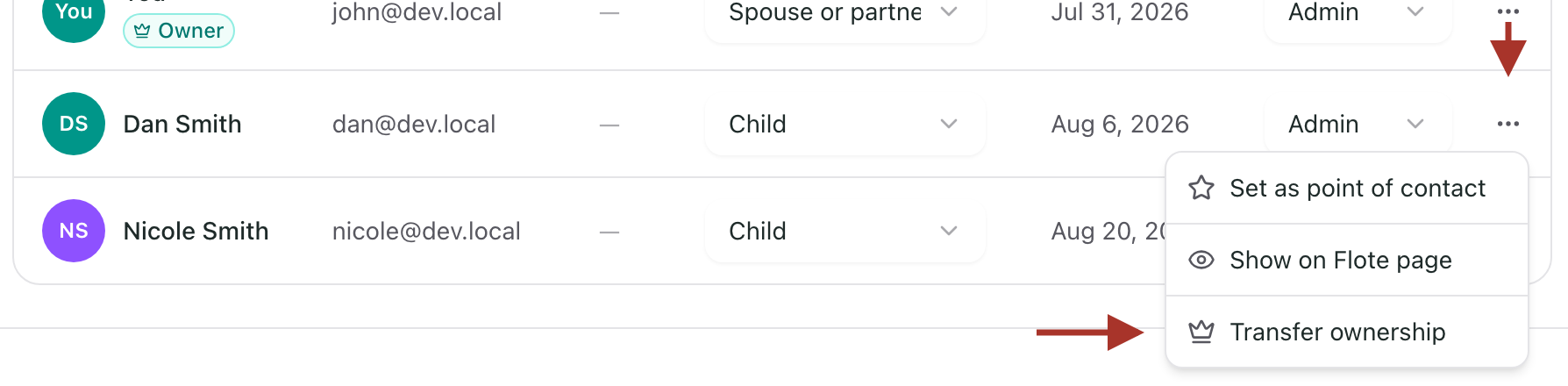
You will be asked to confirm.
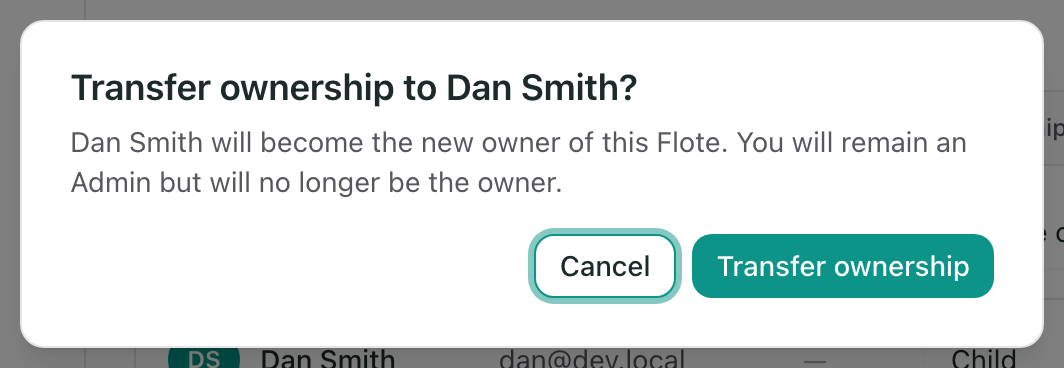
What changes, and what does not
They become the owner, and can now delete the Flote and transfer it onward. If they were a member, they become an admin at the same time.
You stay an admin, so you keep everything else. Nobody is removed, and nothing about the Flote itself changes.
Only the current owner can do this, and only to somebody who already has an account. Somebody with an invitation still outstanding cannot be given the Flote until they accept it.
When you have to transfer first
Two things the app will not let you do until ownership has moved:
- Remove the owner. See Remove someone from your Flote.
- Change the owner's role. The owner is always an admin, so stepping them down is refused.
Both are the same rule seen from different angles: a Flote cannot be left without an owner, and the owner cannot be left without the access to run it.
If the owner is not reachable
Email support@aflote.com. We will contact them, and if we do not hear back we can move ownership to another admin.
Related articles
Was this article helpful?