How to add an Amazon List to your Flote
An Amazon List gives your circle a practical way to help with the things you need. Add a list, registry, or single-product link to your Flote, and people can shop on Amazon without having to ask which item or store would help most.
Need to make a List first? See How do I create an Amazon List?.
You must be a Flote admin to access Ways to Help and edit these settings.
Affiliate disclosure: Aflote creates an affiliate link for eligible Amazon links added to your Flote. Aflote may earn a commission on qualifying purchases, at no extra cost to the supporter or your Flote.
Add an Amazon List or product link
Open your Flote and select Ways to Help in the sidebar. Select Edit.
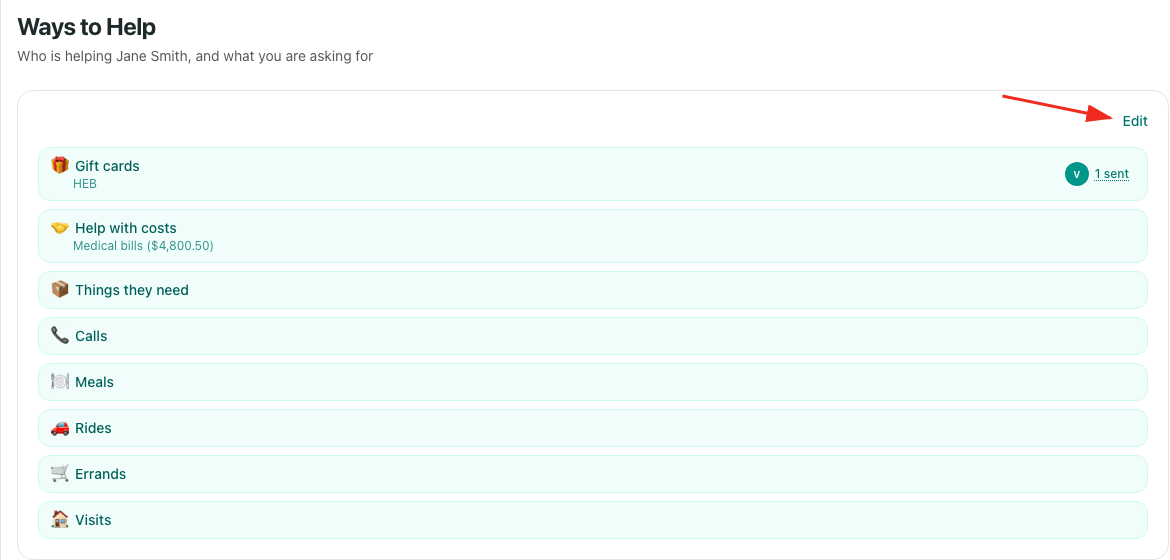
Under How can people help?, select Things they need.

Paste your link into Amazon list or product link.

You can add:
- An Amazon List or wishlist link
- An Amazon registry link
- A short Amazon link, such as
amzn.toora.co - A link to one Amazon product
An Amazon List is usually the best choice. Amazon can mark items as purchased and use the list's delivery settings, which helps prevent duplicate gifts and keeps your address private. A single product link works too, but it does not provide those list features.
Select Save.
The Amazon link also appears as a pointer in Settings > Connected tools. That row takes you back to Things they need in Ways to Help, where the link is edited.
What your circle sees
After you save the link, your circle sees an Amazon card under Things they need. They select See the list for a list, wishlist, registry, or short link, or Buy it for a single product.

The button opens Amazon in a new tab. Aflote does not currently sell the item, take payment, or receive the card. The purchase and delivery happen through Amazon.
Change or remove the link
Return to Ways to Help, select Edit, and open Things they need. Replace the link in Amazon list or product link, or clear the field to remove it, then select Save.
Related articles
Was this article helpful?